> ## Documentation Index
> Fetch the complete documentation index at: https://developer.box.com/llms.txt
> Use this file to discover all available pages before exploring further.
# JWT Auth
export const SignupCTA = ({children}) => {
return
;
};
export const Link = ({href, children, className, ...props}) => {
const localizedHref = localizeLink(href);
return
{children}
;
};
Server-side authentication using JSON Web Tokens (JWT) is the most common way to
authenticate to the Box API. JWT is an [open standard](https://jwt.io/)
designed to allow powerful server-to-server authentication.
Server-side authentication using JWT is available to
Platform Apps.
This authentication method does not require end-user
interaction and, if granted the proper privileges, can be used
to act on behalf of any user in an enterprise.
To use JWT, create a **Server Authentication** app and set its method to **JWT**.
Depending on your enterprise's **Switch server app auth type (CCG or JWT)**
setting, you select **JWT** when you create the app or switch to it later from
the **Configuration** tab. When switching is enabled, you can
change between JWT and Client Credentials
at any time.
Upon authorizing a JWT application, a
Service Account is automatically generated and is the default
Access Token used when authenticating. Because the Service Account has admin-like
privileges, JWT applications must be authorized before use.
## When to use JWT
Server-side authentication with JWT is the ideal authentication method for apps
that:
* Work with users that don't have a Box account
* Want to use their own identity system
* Don't want users to have to know that they are using Box
* Want to store data within the application's Box account and not within the user's Box account
A free developer account gives you access to the Developer Console, where you can create a JWT application and start authenticating server-to-server in minutes.
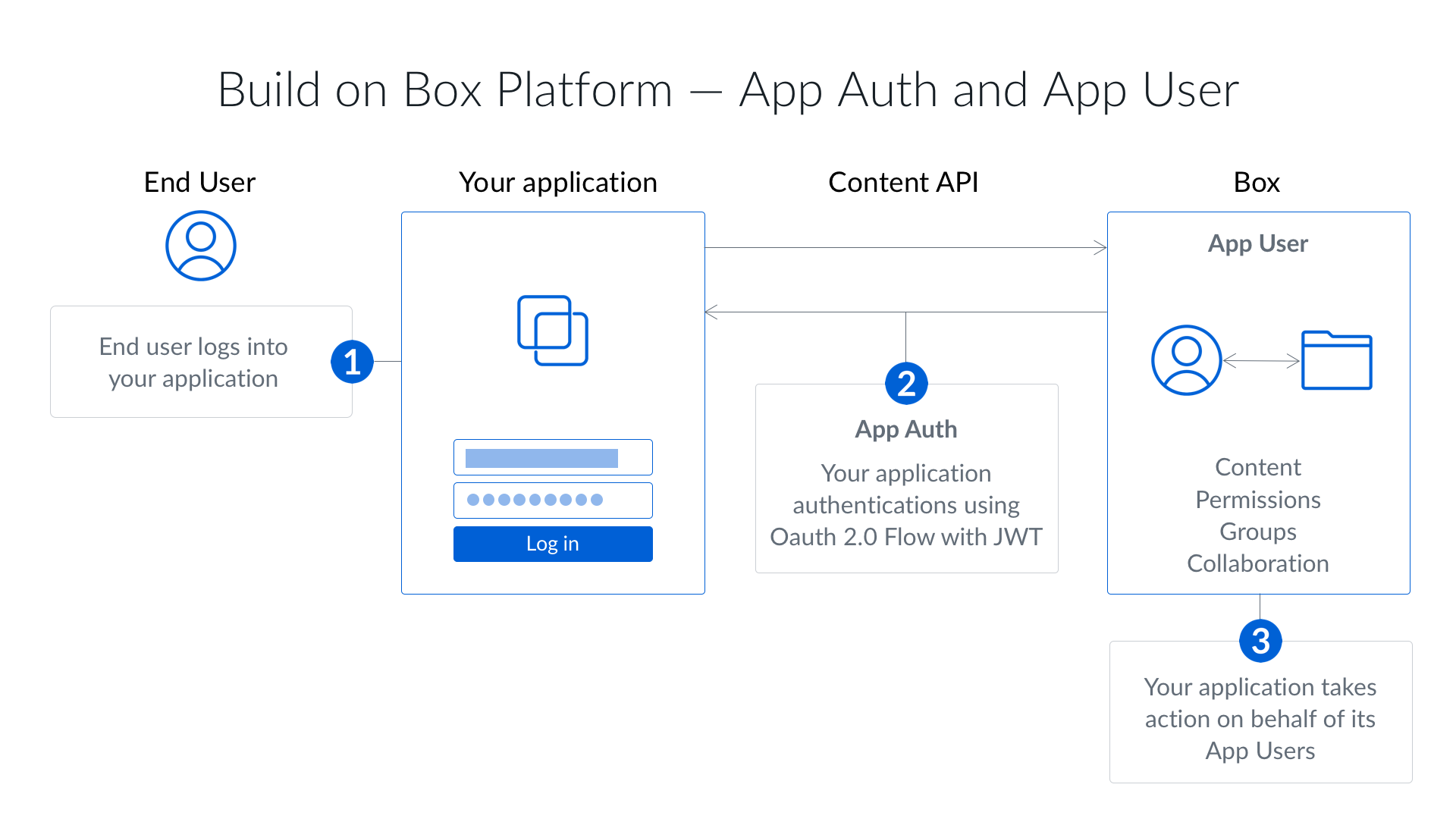 Server-side authentication using JWT is available to
Platform Apps.
This authentication method does not require end-user
interaction and, if granted the proper privileges, can be used
to act on behalf of any user in an enterprise.
To use JWT, create a **Server Authentication** app and set its method to **JWT**.
Depending on your enterprise's **Switch server app auth type (CCG or JWT)**
setting, you select **JWT** when you create the app or switch to it later from
the **Configuration** tab. When switching is enabled, you can
change between JWT and Client Credentials
at any time.
Upon authorizing a JWT application, a
Service Account is automatically generated and is the default
Access Token used when authenticating. Because the Service Account has admin-like
privileges, JWT applications must be authorized before use.
## When to use JWT
Server-side authentication with JWT is the ideal authentication method for apps
that:
* Work with users that don't have a Box account
* Want to use their own identity system
* Don't want users to have to know that they are using Box
* Want to store data within the application's Box account and not within the user's Box account
Server-side authentication using JWT is available to
Platform Apps.
This authentication method does not require end-user
interaction and, if granted the proper privileges, can be used
to act on behalf of any user in an enterprise.
To use JWT, create a **Server Authentication** app and set its method to **JWT**.
Depending on your enterprise's **Switch server app auth type (CCG or JWT)**
setting, you select **JWT** when you create the app or switch to it later from
the **Configuration** tab. When switching is enabled, you can
change between JWT and Client Credentials
at any time.
Upon authorizing a JWT application, a
Service Account is automatically generated and is the default
Access Token used when authenticating. Because the Service Account has admin-like
privileges, JWT applications must be authorized before use.
## When to use JWT
Server-side authentication with JWT is the ideal authentication method for apps
that:
* Work with users that don't have a Box account
* Want to use their own identity system
* Don't want users to have to know that they are using Box
* Want to store data within the application's Box account and not within the user's Box account